Most WFH gear advice is either way too expensive ("just get a Herman Miller chair") or too basic ("good internet, nice background"). This list is the middle path — specific products at real-world prices that make a material difference to your workday without turning your home office into a capital project.
- Top pickBranch Ergonomic Chair~$350
- Best budgetVIVO Single Monitor Desk Mount Arm~$35
The chair you can actually afford: Branch Ergonomic Chair
A bad chair causes real physical problems over time. A great chair doesn't have to cost $1,400. The Branch Ergonomic Chair is $350, adjusts in 7 dimensions, has lumbar support that actually works, and looks professional on video calls. It's the chair that keeps showing up in "best ergonomic chairs under $500" lists because it's genuinely excellent at the price. The adjustable armrests alone solve most desk-related shoulder problems.
The monitor riser that changes everything: VIVO Dual Monitor Stand
Monitor height is the most commonly wrong thing in home office setups. Your eyes should be level with the top third of the screen — if you're looking down at your monitor, your neck will eventually notice. A monitor arm takes the screen off the desk, frees desk space, and puts it exactly where it should be. The VIVO single-arm is $35 and handles monitors up to 32" and 17.6lbs. Installation takes 15 minutes.
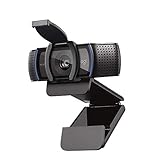
The webcam that doesn't look like 2012: Logitech C920s
Your laptop's built-in webcam produces video that makes you look like you're calling from a submarine. The Logitech C920s is 1080p, has a built-in privacy shutter, works with all video call platforms without drivers, and costs $70. It clips onto any monitor. The upgrade from built-in to this webcam is immediate and dramatic — you'll look like someone who takes their calls seriously.
The keyboard that makes you actually want to type: Keychron K2
Mechanical keyboards make typing noticeably better and more accurate. The Keychron K2 is the most recommended entry-level mechanical: compact 75% layout (no numpad, keeps your mouse close), Bluetooth + USB-C, Mac and Windows compatible, and available with three switch types (red for smooth/quiet, blue for clicky, brown for tactile). It's $90 and once you type on it, every membrane keyboard feels like mush.
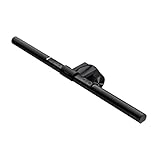
The desk light that eliminates glare on calls: BenQ ScreenBar
The BenQ ScreenBar sits on top of your monitor and illuminates your desk without creating any screen glare (the patented asymmetric optical design directs light only at the desk surface). On video calls, this means your face is evenly lit by your desk lamp rather than looking dark with a bright window behind you. It also doesn't take up any desk space since it mounts on the monitor. At $110, it's the WFH buy that makes the biggest visual difference.
Frequently asked questions
What's the single most important WFH purchase?
A good chair, if you're spending 6+ hours at your desk. Bad seating causes compounding physical problems that become expensive to treat. After the chair: monitor height (arm or riser), then lighting.
Do I need a mechanical keyboard?
Not need, but it's a legitimate quality-of-life improvement if you type extensively. Mechanical keyboards reduce typos (better tactile feedback), last 50–100 million keystrokes vs 5–10M for membrane, and make typing more satisfying. Worth it if you type more than 4 hours a day.
What's the best budget WFH upgrade under $50?
A monitor arm/riser ($35–50) to get the screen at eye level, or the Logitech webcam if you're doing regular video calls. Both have immediate visible impact.
What's the ideal monitor distance and height?
Monitor center at roughly arm's length away (20–30"), top of screen at or slightly below eye level, tilted slightly back (10–20 degrees). Most people have their monitors too low and too close.
The AI voice tool creators actually use
If any part of your setup exists to record, narrate, or publish content: ElevenLabs turns written text into narration that passes for human. We use it ourselves. Free tier is 10,000 characters a month, no card required.
Try it free →Affiliate link — supports the site at no cost to you.