By 4pm your eyes ache, your neck is stiff from leaning toward the screen, and you've blinked about a third as often as you should have in the last two hours. Everyone blames "screen time" for this, which is true in the vaguest possible sense and useless as advice. The actual mechanism is almost always lighting — specifically, the contrast between your bright screen and a dim room, and the glare bouncing off your monitor from whatever's lighting your face. Fix the lighting and most "screen fatigue" gets dramatically better, often within a single afternoon.
That's what this comparison is really about: not "which light is prettier" but which setup actually reduces the two things that cause eye strain at a desk — glare and contrast mismatch. The two contenders are a monitor-mounted light bar, a slim fixture that clips to the top of your screen and points down at your desk, not at you, and a traditional desk lamp sitting somewhere on your desk surface. Both put light where you need it. They do it very differently, and the difference matters more than most people assume when they're shopping.
Why your eyes hurt by 3pm — the actual science, not the scary headlines
Blue light gets blamed for everything, and honestly, it's mostly a red herring for daytime eye strain. The bigger issue is contrast ratio — the brightness difference between your screen and its surroundings. A monitor at full brightness in a dim room can be five or ten times brighter than the wall behind it. Your pupils are constantly adjusting between that bright rectangle and the dark room around it, and that micro-adjustment is genuinely tiring for the muscles controlling your iris and lens. It's the same reason your phone feels worse to look at in a dark bedroom than in daylight — same screen, wildly different contrast.
Glare is the second culprit, and it's mechanical, not neurological. Any light source positioned to reflect off your screen — a ceiling light behind you, a lamp at the wrong angle, a bright window — creates a washed-out patch on your display. Your eyes try to focus through the glare and the text behind it at once, a losing battle that ends in squinting and that gritty, sandpaper feeling by late afternoon. This is also why "just turn the brightness down" only half-works: it eases contrast but does nothing about glare.
Color temperature is the third factor, more about comfort than eye damage. Cooler light (5000-6500K, bluish-white) feels alert and matches daylight, good for focus but rough on sleep at 9pm. Warmer light (2700-3000K, amber-ish) is easier on tired eyes in the evening. The best setups let you adjust through the day instead of locking into one temperature.
The case for a monitor light bar: light where you need it, not light you have to look past
A monitor light bar solves the glare problem almost by design. It clips to the top edge of your monitor with a counterweight clamp, and instead of shining forward into the room, it angles down onto your desk — the keyboard, the notepad, the coffee mug — while staying almost entirely out of your direct line of sight. Because the light source sits above and slightly forward of the screen rather than beside or behind it, it can't create the reflective glare that a lamp at eye level tends to produce.
The BenQ ScreenBar is the model that popularized this category, and it's still the one worth buying. It uses asymmetric optics — the lens is shaped so light spreads across your desk without spilling upward into the screen or your eyes. It clips onto monitors up to about 1.5 inches thick without tools, draws power from a USB port (no outlet, no extra cable), and has touch controls for brightness and color temperature, plus a built-in ambient light sensor that auto-adjusts brightness through the day.
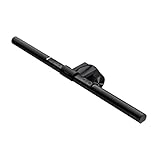
The zero-footprint part matters more than it sounds. A light bar mounts on the monitor itself, above your workspace, so the surface in front of you stays entirely usable — no base, no cord to route around a keyboard, mouse, and coffee mug.
The traditional desk lamp: still useful, still has a real place
None of this makes desk lamps obsolete, and it's worth saying clearly: if you already have one you like, you don't need to throw it out and buy a light bar. A good adjustable-arm desk lamp, positioned correctly — to the side, not directly in front of your monitor, angled down and away from the screen — does the same fundamental job of filling in the ambient light gap so your eyes aren't whiplashing between a bright screen and a dark room. Lamps also do things a light bar can't: they light an entire desk area evenly for tasks that have nothing to do with your monitor, like sketching or handwriting notes, and a warm-toned lamp in the evening does more for winding down than a bar clipped to a screen you're trying to step away from.
We've covered desk lamp picks in depth elsewhere on this site — if you want a dedicated lamp recommendation, that's the better read. This article is specifically about the light-bar-versus-lamp decision for reducing eye strain at a monitor.
Head to head: glare, footprint, cost, and actual effectiveness
Glare goes to the light bar, clearly. Its whole design is built around not shining into your eyes or your screen — the asymmetric lens is engineered specifically to prevent the reflective glare that's the single biggest cause of squinting at a monitor. A desk lamp can be positioned to avoid glare too, but it takes trial and error, and it drifts out of position every time you bump the desk.
Footprint goes to the light bar, decisively. Zero desk space used versus a base, a cord, and a chunk of real estate a lamp permanently occupies. If desk space is tight, this alone can be the deciding factor.
Cost is close. A basic desk lamp can be had for $20-30, well under a name-brand light bar. But a quality adjustable-arm lamp with real brightness and dimming control runs $40-80, roughly the same range as the BenQ ScreenBar at around $120 — once you factor in that the light bar eliminates the need for a separate USB charger or outlet, since it powers straight off your monitor.
Effectiveness for screen-specific eye strain goes to the light bar. It was built for exactly this job: lighting your immediate workspace without competing with your screen for your eyes' attention. A desk lamp is a generalist tool doing a specialist's job reasonably well; a light bar is a specialist tool, and it does that one job better.
Versatility goes to the desk lamp. If you need light for reading, handwriting, or general room lighting beyond your monitor's footprint, a lamp does more. A light bar is monitor-adjacent lighting and nothing else — excellent at its job, useless outside it.
Don't forget the room: why ambient light changes the whole equation
Here's the thing neither a light bar nor a desk lamp fixes on its own: the contrast between your desk and the rest of the room. If your desk is a bright island in an otherwise dark room, you've solved the screen-to-desk contrast problem but created a new one between your desk and everything past it. Your eyes are still adjusting, just over a slightly larger radius.
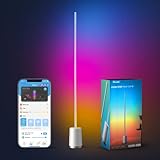
This is where a secondary ambient light source earns its place, especially for anyone working evenings or in a room with only one window. A floor lamp or corner light that raises the room's baseline brightness — not aimed at anything specific — closes that gap. It doesn't need to be bright, just present, so your eyes aren't jumping from "desk lit like an operating table" to "rest of the room lit like a cave." A color-adjustable option helps, since you can match warmer evening tones to whatever temperature your monitor light and lamp are running, instead of mixing color temperatures across one field of view.
The verdict: who should actually buy which
If your main complaint is eye strain tied to working at a monitor for hours — the tired, achy, squinty feeling by mid-afternoon — the light bar is the better tool for that exact problem, and it's not close. It's purpose-built to eliminate glare and fill the screen-to-desk contrast gap without taking up a single inch of workspace. For most people reading this, that's the answer.
If you split your time between screen work and other desk tasks — reading, writing by hand, craft projects — keep or buy a good desk lamp, and consider adding a light bar as a second layer rather than a replacement. They're not mutually exclusive; plenty of serious desk setups run both.
And regardless of which one you choose, don't skip the room-level ambient light. It's the cheapest fix here and the one people skip most, right up until they realize their "new lamp didn't fix anything" complaint was actually a whole-room contrast problem.
Does a monitor light bar actually reduce eye strain, or is it marketing?
It genuinely helps: it fills the screen-to-desk contrast gap without creating the reflective glare a poorly angled lamp can cause. It's not a cure for eye strain from other causes (uncorrected vision, too-small text, not blinking enough), but for fatigue from glare and contrast mismatch specifically, it's one of the more effective single-product fixes available.
Can I use a monitor light bar on any monitor?
Most light bars, including the BenQ ScreenBar, clip onto monitors up to about 1.5 inches thick using a counterweight clamp — no screws or adhesive. Curved ultrawides and very thin bezel-less displays are worth double-checking, so measure your monitor's top edge before buying.
Is blue light from monitors actually the cause of eye strain?
Not really, despite how often it gets blamed. Daytime eye strain is mostly about contrast ratio and glare, not blue light wavelength. Blue light matters more for sleep disruption if you're on a screen before bed, which is a separate issue from tired, achy eyes after an afternoon of work.
Do I need both a light bar and a desk lamp?
Not necessarily, but plenty of people run both: a light bar for glare control at the monitor, a lamp for general task lighting otherwise. For pure eye-strain relief at a monitor, the light bar wins. For broader desk lighting, add a lamp.
What color temperature should I use for the least eye strain during work hours?
Around 4000-5000K (neutral white) works well for most people during the day — bright enough to feel alert without the harshness of full 6500K daylight. Shift warmer, toward 3000K, in the evening if you're working late; it's easier on tired eyes and less disruptive to sleep afterward.
Will a monitor light bar fix a glare problem caused by a window, not a lamp?
Partially. A light bar removes glare from a poorly placed lamp or overhead light, but can't fix glare coming directly off a window behind or beside your monitor. For window glare, reposition your desk so the window is to the side, or add a diffusing curtain — lighting fixtures alone won't solve it.