Every "ultimate desk setup" list assumes an unlimited budget and a strong opinion about walnut versus oak. Most people don't have either — just a laptop, a chair they're mildly annoyed by, and maybe $200 to spend. The real question isn't "what's the dream setup," it's "which handful of things actually move the needle on how my day feels?"
- Top pickLogitech C920s HD Webcam~$70
- Best budgetTile Mate Bluetooth Tracker~$25
- Worth the splurgeBenQ ScreenBar Monitor Light~$120
So we ranked it, by how much daily friction each upgrade removes per dollar — not by what looks best in a flat-lay photo. A few things people obsess over (standing desks, mechanical keyboards, monitor arms) didn't make the cut, because any one blows past $200 alone. This is what fits inside a $200 budget, stacked in the order we'd actually buy it, with a running total so you know where the money goes and when to stop.
Rank #1: Fix how you look on video calls first (it's not close)
If you spend any part of your week on video calls, your webcam does more daily emotional labor than almost anything else on your desk. A bad built-in laptop camera makes you look like you're being interviewed from a submarine: grainy, underlit, weirdly angled up your nostrils. People notice, even when too polite to mention it. And unlike most things here, a better webcam benefits other people too — which matters on calls with clients, a boss, or in-laws who already have opinions about you.
The Logitech C920s has been the default pick in this category for close to a decade, for good reason: it just works. Plug it in, no software fuss, 1080p that actually looks like 1080p, and a physical privacy shutter so you're not relying on a piece of tape. Not flashy — reliably, boringly good, exactly what you want from hardware whose entire job is to make you look normal.
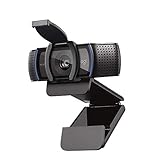
Running total: $70. That's rank #1, and if your budget stopped right here, it would still be the single best $70 you spent on your desk all year.
Rank #2: Audio is the thing people notice before video
Here's a fact that surprises people: on a video call, bad audio is more distracting than bad video. A blurry picture reads as "bad wifi" and gets ignored. A crackly, echoey mic reads as "I can't understand you" and forces the other person to work harder for the whole call. Most people fix video first because it's visual, then wonder why calls still feel exhausting.
You don't need a $200 podcast mic to fix this. Earbuds with a built-in mic handle most of the problem, because the mic sits close to your mouth instead of two feet away in a laptop bezel. The Soundcore P3i is the unglamorous, extremely competent pick — noise cancellation so you're not straining over a barking dog, a mic that isolates your voice, and a case that doesn't die by lunchtime. It also doubles as your everyday earbuds, the kind of dual-purpose buy that stretches a $200 budget further.
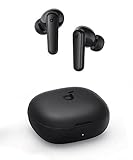
Running total: $115. Webcam plus decent audio, and you've already fixed the two things everyone else on your call is actually judging you on.
Rank #3: Cable management, because visual chaos has a real cost
This one gets underrated the hardest, because it doesn't feel like it "does" anything. It doesn't make you look better on a call or help you find your keys. What it does is remove a small, constant irritation every time you sit down: the tangle of charging cables, the visible power strip, the cord you have to untangle to plug something in. None of that is a big deal alone. All of it, every day, adds up to a desk that quietly stresses you out before you've opened your laptop.
A cable management box is a genuinely boring product that solves this almost completely. Your power strip and the tangle of cords go inside, cords exit cleanly through the side slots, and the chaos disappears in about ten minutes. The Anker box is ventilated — don't buy one that isn't — fits most standard power strips, and its lid actually stays closed. Amazon files it under "home," not "desk," but it belongs on this list more than half the things that do.
Running total: $141. This is the cheapest "I can't believe I waited this long to buy this" purchase on the entire list.
Rank #4: A tracker, so you stop losing the same three things
This one sits slightly outside "desk" and squarely inside "your desk is also where your life gets staged before you leave the house." If you set keys or a bag down near your desk and then spend five panicked minutes hunting for it, a $25 tracker fixes a problem you've been solving with pure adrenaline for years.
Tile Mate is the cross-platform pick: works with Android and iPhone, clips onto a keychain or bag, and gives you a "find nearby" ring plus a crowd-find network if you lose the item out in the world. Not glamorous, but the math is simple — one Tile Mate pays for itself the first time it saves you from missing a flight because you couldn't find your keys.

Running total: $166. Four purchases in, and you've covered how you sound, how you look, how your desk looks, and how often you lose things — all for under $170.
Rank #5: Monitor lighting is genuinely great, and genuinely the one to wait on
The BenQ ScreenBar is excellent, no argument. It clips to the top of your monitor, throws light down using optics engineered to avoid glare on your screen, and comes with a proper dimmer and color-temperature control. If you sit at a desk six-plus hours a day under one sad overhead bulb, good task lighting measurably helps how tired your eyes feel by 4pm.
Here's the honest math: it's $120 on its own, which blows past a $200 budget the moment you've already bought the webcam, earbuds, cable box, and tracker above. That's why it's ranked here instead of first — not because it isn't good, but because per dollar spent it does less daily work than fixing how you sound and look on calls, and costs more than the other three combined. Building this in order with exactly $200, buy the first four and put the ScreenBar on next month's list.
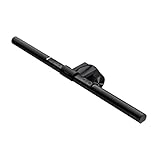
Swap it in for the Tile Mate and you land at $261 — over budget on purpose. That's the tradeoff: the one item here worth stretching past $200 for.
The actual $200 breakdown (and the one swap worth knowing about)
The full stack in priority order, running total spelled out so there's no ambiguity about what actually fits:
- Webcam (Logitech C920s) — $70 — running total $70
- Earbuds with mic (Soundcore P3i) — $45 — running total $115
- Cable management box (Anker) — $26 — running total $141
- Item tracker (Tile Mate) — $25 — running total $166
That's $166 of a $200 budget, $34 left over — enough for a mouse pad, not enough for the ScreenBar. Already deep in the Apple ecosystem? The AirTag 4-pack is the swap to know about. At $99 for four, it's pricier per unit, but you get one for keys, one for a bag, one for a laptop sleeve, and one spare — all inside the network you're probably already using for your phone.
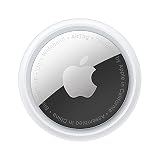
Swapping AirTags in for the single Tile Mate pushes your total to $240 — over budget, but only if you count all four. Buy the pack anyway and put one to work now; the other three wait for the next thing you inevitably misplace.
The larger point holds no matter which swap you make: buy in the order of what people actually notice every day, not what looks impressive in a desk tour photo. Webcam and audio first — what everyone on your calls is silently judging. Cable management and a tracker next — friction you've stopped noticing but haven't stopped feeling. Lighting last, because at $120 it deserves its own budget instead of eating your whole one.
Frequently asked questions
What's the single best desk upgrade if I can only buy one thing?
The webcam. It's the one upgrade other people actually see and hear the effect of, every call you take. The Logitech C920s at $70 is the highest-impact individual purchase on this list.
Is monitor lighting really worth $120?
Yes, once webcam and audio are covered. The BenQ ScreenBar meaningfully cuts eye strain on long desk days. But at $120 it eats more than half a $200 budget alone, which is why it's ranked lower — not a bad product, just less daily work per dollar.
Do I need both a webcam and better earbuds, or just one?
Both if you can swing it — they solve different problems, and audio affects how well people follow you more than video does. If you can only pick one, start with audio. It's cheaper, and worse when it's bad.
Are AirTags or Tile trackers actually worth it for a desk setup?
Either works — clip one to your keys or bag and stop the daily search-and-panic before leaving the house. AirTags integrate more smoothly in Apple's ecosystem; Tile works across Android and iPhone and is cheaper per unit if you only need one.
What should I buy after I've spent the first $200?
Monitor lighting (the BenQ ScreenBar) is the natural next purchase, then a desk mat and, further out, a monitor arm or mechanical keyboard — both cost more than $200 alone, which is why they didn't make this list.
Is a cable management box really necessary, or just aesthetic?
Mostly about removing a small daily annoyance, though it looks better too. A tangle of visible cords doesn't register consciously but adds noise every time you sit down. At $26, it's one of the cheapest, highest-return fixes here.